
A production set leaves your desk in an hour: fourteen files in order, every redaction finished, every page checked against the request. Then a reviewer asks about page 2 of the second attachment, and the answer depends on which file they opened, which version they printed, and whether they counted the cover sheet.
Bates numbering exists to make that question answerable. It gives every page in a collection one identifier that never restarts and never repeats, so a citation survives merging, printing, copying and a year of email. A clean Bates numbering PDF workflow is mostly a matter of sequence and order, and the order gets easier to keep once you know what each part of the identifier is doing.
Most numbering failures aren't stamping failures. They're sequencing failures: pages stamped before the set was final, files stamped one at a time, a digit width changed halfway through. The steps below are the ones that prevent those, in the order that prevents them.
Table of Contents
- Bates Numbers and Ordinary Page Numbers Compared
- Choosing a Prefix, Start Number and Digit Width
- Placing the Stamp Where Every Page Stays Readable
- How to Stamp Sequential Bates Numbers
- Fixing Duplicate, Missing and Out-of-Order Identifiers
- Confirm the Numbering Before You Send the Set
Bates Numbers and Ordinary Page Numbers Compared
Two attachments land in the same production folder. Each opens at page 1, each prints a footer reading page 2 somewhere in the middle, and last week's memo cites "page 2 of the second attachment." Nobody misread anything. The label was scoped to one file; the memo was written about the whole set.
A Bates identifier removes that ambiguity by belonging to the collection rather than to the file. The U.S. District Court for the Eastern District of Tennessee's Bates stamping guidance describes its CM/ECF PageID system as a unique page number for every page in a case record, with identifiers sequenced according to the order in which documents are filed. That's the working model here: one sequence, applied to the final order, surviving every merge and reorder.
So if the first document ends at ACME-000125, the second begins at ACME-000126, even though its own footer still says page 1. A citation to ACME-000126 resolves to one page in the entire production, and it resolves the same way for your team, for opposing counsel, and for a judge reading a brief six months from now.
Two numbering jobs, not one
Ordinary page numbers aren't wrong. They answer a narrower question, and they answer it well: where does this page sit inside this document? They usually come from the document's own layout or from a page-numbering setting in whatever produced the file, which is why they restart when a new file begins.
Bates stamps come from a separate step you run after the set is settled. That step doesn't care what the underlying file's footer says. It walks the final page stream and writes one continuous identifier, so the label and the file's own numbering can coexist without contradicting each other.
| Feature | Ordinary page number | Bates identifier |
|---|---|---|
| Scope | Restarts at 1 in each document | Unique across every page in the set |
| Typical form | 1, 2, 3 | Prefix plus padded number, such as ACME-000126 |
| Citation use | Ambiguous across attachments | Points to one page in the production |
| Applied by | Document layout or page-numbering setting | Stamping step run after the set is final |
| If pages are added | Renumbers within one file | Labels must be removed and the sequence rerun |
The last row is the one people underestimate. Adding a page to a single document with ordinary page numbers is a small annoyance. Adding a page to a numbered production set invalidates every citation that follows it, which is why the stamp belongs at the end of the process and not the middle.
Rule of thumb: if the set will be cited, exchanged or produced to someone else, give it Bates identifiers. If you're sending one standalone file to one reader, an ordinary page number does the job and costs less attention.
For a single document that never joins a larger set, the page numbers tool inserts a footer or header sequence without touching anything else. The moment that document becomes attachment two of five, you need the other kind of number.
Choosing a Prefix, Start Number and Digit Width
Set the identifier format against the final page stream: the complete sequence of pages after files are merged, reordered, or redacted. Each page then receives one unique identifier, regardless of which source file it came from.
A Bates identifier commonly combines a prefix, a sequence number, and sometimes a suffix. The prefix identifies the producing party or matter. The number marks the page's position in the sequence. A suffix can add a classification, such as a confidentiality marker, when the production instructions allow it.
For example, two parties can each begin at 0001 if their prefixes differ: PLAINTIFF-0001 and DEFENDANT-0001. Without those prefixes, both pages would have the same identifier.
Start a new sequence at 1. For a follow-on production, continue from the previous set's last number plus one. That keeps citations unique across both deliveries.
Why the digit width is a decision, not a default
Leading zeros give every number the same width. That makes identifiers easier to sort and search: CASE-0002 appears before CASE-0010 in text-based listings, while unpadded numbers can sort incorrectly.
| Digit width | First identifier | Page 100 identifier | Largest identifier |
|---|---|---|---|
| 3 digits | ACME-001 | ACME-100 | ACME-999 |
| 4 digits | ACME-0001 | ACME-0100 | ACME-9999 |
| 6 digits | ACME-000001 | ACME-000100 | ACME-999999 |
Production instructions may specify the prefix, starting number, digit width, placement, or suffix. Check the court rules, ESI protocol, discovery agreement, or opposing counsel's instructions before numbering. Changing the width partway through creates inconsistent identifiers and can disrupt sorting.
Choose a width that accommodates the expected page count, with room for additions. For a small set, three digits allow up to 999 pages; six digits allow up to 999,999. Keep the same width for later productions in the sequence.
Placing the Stamp Where Every Page Stays Readable
The page that breaks a stamp is rarely the plain one. It's the lease exhibit with a signature block running to the bottom margin, the scanned bank statement that already has a footer of its own, the table that fills the page edge to edge. Drop an identifier where the content lives and you've made the page harder to read and the citation harder to trust.
A correctly placed stamp sits in reserved white space rather than over content, which is the standard the page below illustrates.
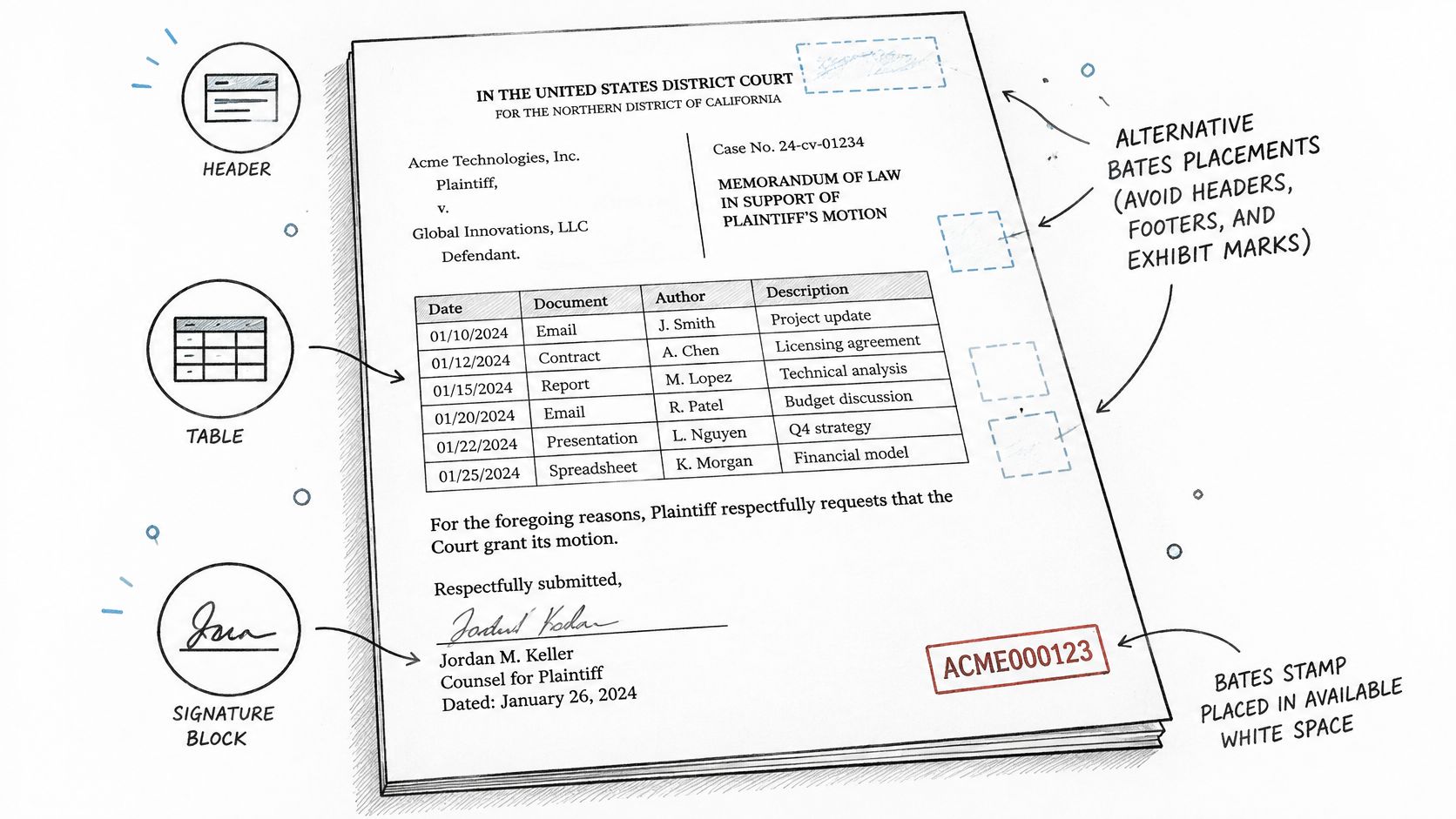
Open your busiest layouts before you commit. Preview the table-heavy page, the scanned exhibit, the page with a signature block, and the page with existing headers or footers. Then reserve a consistent margin, or use the overlay position your court's rules specify, and check the rendered PDF rather than the editable annotation layer. The annotation can sit neatly in a preview and render three points lower in the delivered file.
Checks that catch a hidden stamp
- Inspect the rendered output, not the text box. Rasterize or print to PDF and look at the page as the recipient will see it.
- Test rotated and low-resolution scans at full size. A stamp that clears one scan can clip the next, and a light grey stamp lost against a dark scan is a missing stamp as far as a reviewer is concerned.
- Confirm nothing else moved. If you flatten the stamp into the page, do it only after checking that annotations, redactions, bookmarks, hyperlinks and accessibility features still work. Flattening locks in whatever is there at that moment.
- Wait for redactions to finish. Stamping before redactions or page exclusions are final means renumbering later, and renumbering means every citation issued so far is wrong.
There's a subtler limit worth naming. A Bates label can be perfectly visible on screen and completely absent from the file's text layer, so a search for ACME-000126 returns nothing even though the number is right there in the corner. PDFWix doesn't perform OCR in its own toolkit, so if the set needs searchable stamps, run the final file through an outside OCR service and then test a few pages by searching for the identifier itself. The header and footer tool is where most editors put this kind of repeated page text, and it's a useful place to confirm your placement options before you commit to a production run.
How to Stamp Sequential Bates Numbers
A 42-page contract, 87 pages of correspondence and 31 pages of exhibits need one continuous sequence. Build that sequence from the final page stream, so each document's numbers follow the pages that will be produced.
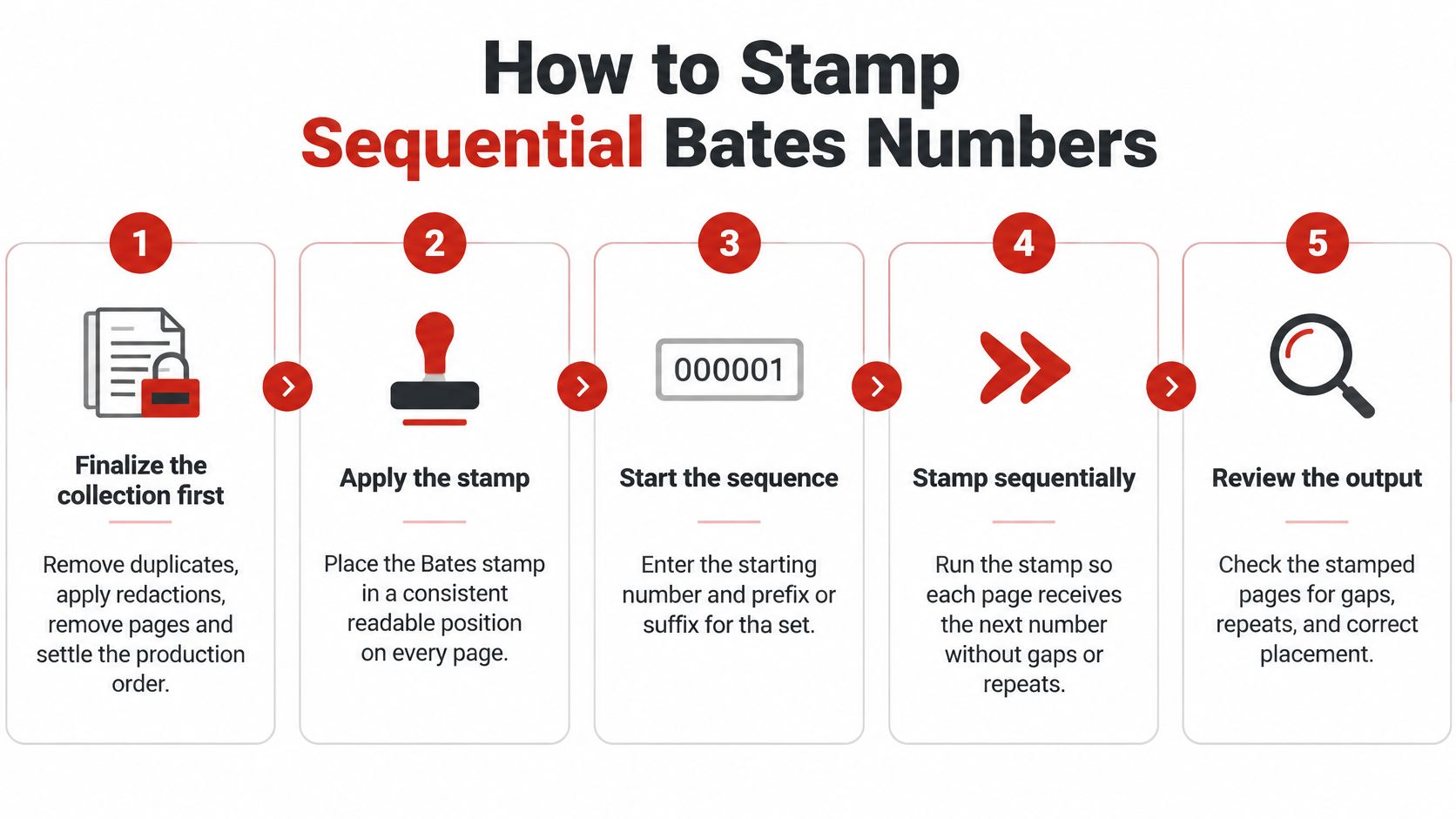
1. Finalize the collection. Remove duplicates, apply redactions, exclude pages that do not belong, and settle the production order. Any later change to the page stream can invalidate identifiers already applied and require another verification pass.
2. Merge or arrange the documents. Put the pages in their final order before numbering. For one combined PDF, add the files, arrange them, and download the consolidated document with the PDFWix Merge PDF tool. If the files must remain separate, decide their order first and carry one counter across them.
3. Set the prefix, starting number and digit width. For example, ACME-0001 uses the prefix ACME-, starts at 1 and uses four digits. Keep the width fixed throughout the set: leading zeros make identifiers sort consistently, while changing width midway can disrupt that order. Follow any numbering format required by the court or discovery agreement.
4. Apply one continuous counter. Each page receives the next identifier in the final sequence. If you stamp separate files, record where each range begins and ends before setting the next file's starting number. Independent counters can assign the same identifier to pages in different files.
5. Apply the stamp. Open the PDFWix Bates numbering tool, drop in the PDF or select it, then enter the prefix, starting number and digit width. The browser-based tools require no signup and add no watermark.
6. Save a new numbered file. Keep the unnumbered source intact. If you discover a missing page or need to change the order, the original gives you a clean starting point for a new run.
7. Check representative pages. Review the first and last pages, plus a dense page where the stamp could be hard to read. Confirm that the displayed identifiers follow the intended sequence and fit the pages.
A worked example
The contract has 42 pages, the correspondence 87 and the exhibits 31. In that order, the set contains 160 pages.
With the prefix ACME- and four digits, the contract runs from ACME-0001 to ACME-0042. Correspondence continues from ACME-0043 to ACME-0129. The exhibits run from ACME-0130 to ACME-0160.
Merging the documents before stamping lets one pass follow that sequence. If the files stay separate, use the same ranges and set each file's starting number to the next identifier after the previous file ends. Record the three ranges so a citation can be matched to the correct part of the production.
Fixing Duplicate, Missing and Out-of-Order Identifiers
A reviewer finds two pages cited as ACME-0120. The citation no longer identifies one page, so the production set needs a correction before anyone relies on that reference. Gaps also raise questions: a sequence that jumps from 000120 to 000125 leaves four identifiers unaccounted for.
| Symptom | Likely cause | Fix |
|---|---|---|
| Two files share the same number | Each file stamped separately with its own counter | Merge the files, then restamp using one sequence across the complete set |
| Numbers sort out of order, such as 10 before 2 | Digit width is missing or changed midway | Restamp the set with one fixed digit width |
| Stamp hidden or clipped on a scanned page | Stamp overlaps margin content or falls on a rotated page | Move it to a clear margin and check rotated pages |
| Sequence skips numbers | Pages were removed, omitted or numbered in separate runs | Compare the final page order with the numbering sequence, then restamp the complete set if needed |
A single-page patch can leave an awkward trail. For example, correcting one page may still leave a jump from 000120 to 000125 that a reviewer has to explain. If pages have been reordered, use the PDF page organization tool to arrange the set first, then apply one continuous numbering sequence to the final page stream.
Confirm the Numbering Before You Send the Set
A production is ready to leave only after the final page stream has been checked. Use this order: finalize the collection, merge and arrange the pages, set a producer-identifying prefix and fixed number width, apply the identifiers, then inspect the rendered pages. Preserve the unnumbered source as well. Federal best practices for electronic production also allow an alternative unique identification and filename convention when page stamping is not technically possible. Record that choice rather than improvising later.
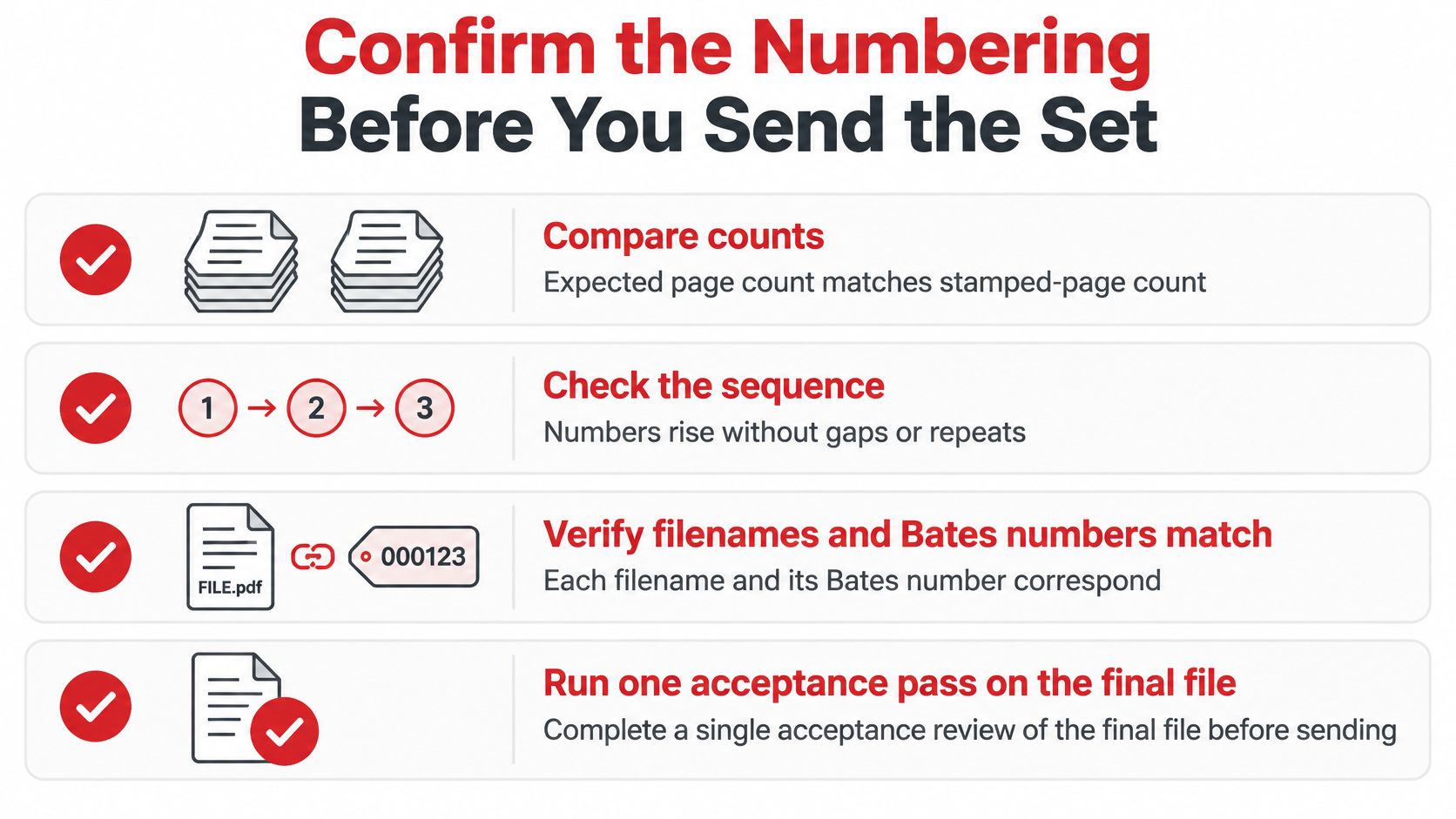
- Compare page counts. Check the expected count against the stamped-page count. A mismatch may indicate a missing or duplicated page.
- Check the sequence. Confirm identifiers rise without gaps or repeats, and that the first and last numbers agree with the manifest.
- Check filenames against stamps. If the receiving protocol requires production numbers or page ranges in filenames, compare each filename with the visible identifier.
- Inspect representative pages. Include pages from each source type, especially a crowded layout, a rotated scan, a redacted page, and the first and last pages.
Keep a manifest with each source filename, page range, Bates range, file hash and processing timestamp. Set the acceptance target to zero duplicate, missing or out-of-order identifiers. A manifest makes it easier to locate a disputed page without reviewing the entire production.
Numbering is one part of preserving a reliable record. The RNC Group digital evidence strategy addresses how to maintain that record from collection through production.
If the checks pass, release the numbered copy and archive the unnumbered source. If one fails, correct the cause and rerun the numbering across the full set. For a file shared by email or link, password-protecting the PDF can restrict access; it does not replace the numbering checks.
PDFWix offers a browser-based Bates numbering tool, with no account required and no watermark added to the output. Start at PDFWix and verify the finished set before sending it.